Export VIOSO VWF
The VIOSO VWF exporter supports export of warping, blending and black level correction for VIOSO WarpBlend API.
This API is used in VIOSO products like Exaplay, and Exaplan.
It is also used in several third party Media Servers, Image Generators and 3D-Engines.
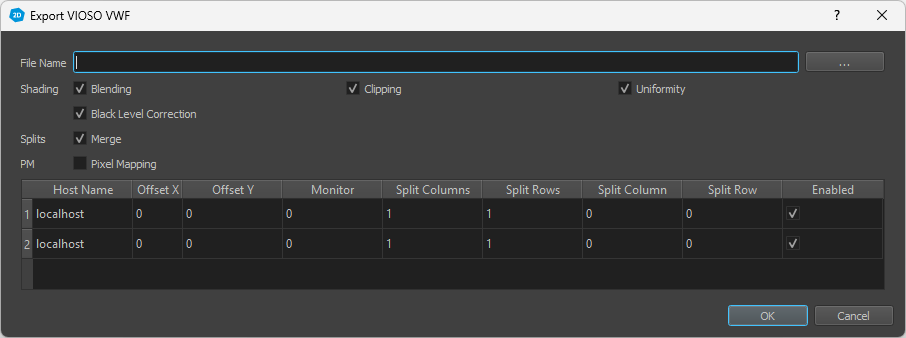
Export Settings
- File Name
The name and place of the created VWF file.
- Shading
Toggle shading features.
- Blending
Enable to add Blending information in exported shading file.
- Clipping
Enable to integrate Clipping information in exported shading file (clipping editor, clipping-image in project-settings)
- Uniformity
Enable to add Uniformity information in exported shading file.
- Black Level Correction
Enable to add Black Level Correction information in exported shading file.
- Splits
- Merge
Enable to merge multiple channels in to one correction map. Used for displays transparently split for multiple projectors, e.g. in Nvidia Mosaic mode.
- PM
- Pixel Mapping
Convert projection mapping data to 2d pixel mapping data. This allows 2d media players to play back uv-mapped content directly.
- Channel Table
Split parameters for each channel.
- Host Name
Network address of the pc, correction data should be used on.
- Offset X/Y
Offset of the channel on the desktop.
- Monitor
Monitor/display number of the channel. Keep the same non-zero monitor number for splits that should be merged, use distinct numbers otherwise.
- Split Columns/rows
Number of splits in x/y direction, that should be merged.
- Split Column/row
Index of the split the channel should be assigned to.
- Enabled
Can be unchecked to exclude from export.